Complete Touchless Expense Auditing: How Audited Expense Reports Can Be Delivered in Seconds
Contents
- 1. The expense audit problem nobody puts in the board deck
- 2. Why manual expense audits miss what matters
- 3. What complete touchless expense auditing actually means
- 4. Before and after: the expense reconciliation process
- 5. How to roll out touchless expense auditing without breaking trust
- 6. FAQs
- 7. Share:
- 8. Recent Post
- 9. 2-Way vs. 3-Way vs. 4-Way PO Matching: Eliminating AP Invoice Bottlenecks
- 10. Global Employee Reimbursement: Managing Multi-Currency Payouts and Cross-Border Tax Rules
- 11. Preventing Expense Fraud: How Real-Time Policy Engines Catch Violations Pre-Submission
The expense audit problem nobody puts in the board deck
Ask a controller how their team audits expense reports, and you’ll often hear a version of this: “We check every report over a threshold, sample about one in ten of the rest, and hope.”
Nobody writes “and hope” in the audit policy. But that’s how it works when expense audit depends on people reading receipts. Reviewers check what they have time for. The rest goes through on trust.
The cost of that trust is measurable. In the ACFE’s Occupational Fraud 2026: A Report to the Nations, expense reimbursement schemes appeared in 13% of the 2,402 cases studied and ran for a median of 18 months before discovery. That’s a year and a half of approved, reimbursed, “audited” reports.
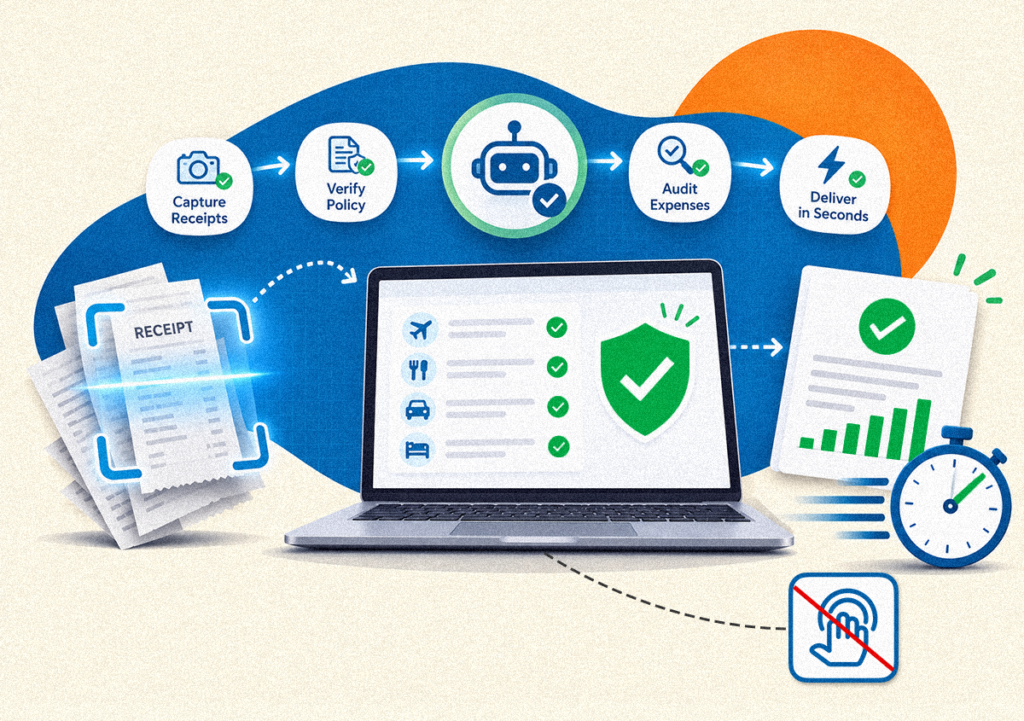
This article explains a different model: complete touchless expense auditing, where expense report automation checks every line before approval and delivers an audited report in seconds. You’ll see how it works, which audit rules it runs, what changes in expense reconciliation, and how to roll it out without employees feeling watched.
Why manual expense audits miss what matters
Sampling is a lottery the fraudster can see
Say you review 10% of reports at random. A $40 duplicate dinner has a 90% chance of going straight through. Submit it every month, and there’s still about a 28% chance it survives a full year of sampling. Even when it’s caught, that’s usually months and several payouts later. Worse, threshold-based audits teach people where the line is. If everything over $500 gets checked, expect a lot of $480 claims.
Read: How to Stop Expense Report Fraud in Your Company?
Audits happen after the money has left
Traditional expense audits are retrospective. The employee has been reimbursed, the card statement is closed, and getting money back means an awkward conversation. Recovery is harder than prevention, and most teams quietly write small amounts off.
Reconciliation eats the audit budget
The time that should go on judgment goes on matching. Reviewers spend hours pairing card lines to receipts, chasing missing images and re-keying amounts. By the time manual expense reconciliation is done, there’s little left for real expense audit work.
What the data says works
The ACFE data is clear about which controls pay off. Organizations with proactive data monitoring and analysis saw median fraud losses of $70,000 against $150,000 without it, a 53% reduction. Schemes were also caught in 9 months instead of 16. In other words, continuous checking by systems beats periodic checking by people. That is the logic behind automated expense reporting with built-in audit.
What complete touchless expense auditing actually means
Complete touchless expense auditing means every expense line is audited by the system the moment it’s created, before any human approves it. Nobody types, matches, or samples. The approver gets a report that has already passed audit, with exceptions spelled out.
That’s a big claim, so here are the rules that sit behind it. A serious expense report automation platform should run all of these on 100% of lines:
Audit rule | What it catches | Example |
Duplicate detection | Same receipt, amount, or image submitted twice, including across employees | Two colleagues both claim the same team dinner |
Card-to-receipt match | Card charges with no receipt, or receipts with no matching charge | A $310 hotel charge with no folio attached |
Policy limits | Spend over category, role, or location caps | A $95 dinner where the cap is $75 |
Per diem and M&IE rates | Meals and lodging over the applicable GSA or company rate | Lodging above the city’s per diem |
Required documentation | Missing receipts where IRS or policy rules require them | Lodging with no receipt at any amount |
Date and trip logic | Expenses outside travel dates, weekend or holiday spend | A taxi in the home city during a trip abroad |
Merchant and category checks | Blocked merchants or mis-categorized spend | A liquor store coded as “office supplies” |
Personal-item detection | Personal charges mixed into business receipts | Minibar and in-room movies on a hotel folio |
Approval routing rules | Self-approval, or approval by someone who reports to the claimant | A manager approving their own manager’s report |
Mileage validation | Claimed miles that don’t fit the route | 140 miles claimed for a 40-mile round trip |
The change isn’t just speed. It’s coverage. Sampling checks a slice of the reports. Touchless auditing checks all of them, every time, with the same rules.
Before and after: the expense reconciliation process
Expense reconciliation and audit, before vs. after – 5 steps each
In the old flow, the audit comes last and covers a sample. In the touchless flow, every line is audited before approval, so the approver sees only exceptions, and card reconciliation finishes as receipts arrive.
What changes for the controller
- Audit becomes exception review. Reviewers stop reading clean reports and work only the flagged lines, each with a reason attached.
- Expense reconciliation runs continuously. Card lines match to receipts as they arrive, so month-end isn’t a scramble.
- Evidence is ready for external audit. Every line links to its source image, the rule it passed, and who approved it.
- Policy gets better data. If one rule fires constantly, the policy may be wrong, not the employees. Now you can see it.
How to roll out touchless expense auditing without breaking trust
The technology is the easy part. The harder part is people: auditing 100% of lines can feel like surveillance if it’s introduced badly. Here’s a sequence that works:
- Clean up the policy first. Automation enforces exactly what’s written. Vague rules (“reasonable meals”) become disputes. Turn them into numbers before go-live.
- Run in shadow mode for one cycle. Let the automated expense reporting engine flag lines without blocking anything. Compare its flags with your manual reviewers’ findings, and tune false positives before employees ever see them.
- Explain it as speed, not suspicion. The honest message: clean reports get approved and reimbursed faster because nobody has to check them by hand. Most employees care far more about getting paid quickly than about being audited.
- Make every flag explain itself. “Over meal cap by $20, attach approval or adjust” works. “Rejected” breeds resentment.
- Set a review SLA for exceptions. Touchless only works if flagged items are cleared quickly. Aim for exceptions resolved within days, not at month-end.
- Review rule hit-rates every quarter. Retire rules that never fire, and rewrite the ones that fire on behavior you’ve decided is fine.
Read: The Finance Controller’s Complete Checklist for Rolling Out Expense Automation
Kill-switch metric: if the share of reports needing manual touch hasn’t dropped clearly after two full cycles, the problem is usually the policy or the data feeds (card files, HR hierarchy), not the employees. Fix those before adding more rules.
FAQs
Expense report automation uses software to capture receipts, categorize spend, match card transactions, check policy, and route reports for approval with little or no manual work. The most advanced form, complete touchless expense auditing, also audits every line before approval.
Automated expense reporting matches card transactions to receipts the moment both exist, so expense reconciliation runs continuously instead of at month-end. Finance teams only handle the exceptions the system flags. For large firms with thousands of card lines a month, that removes most of the matching work.
Yes. Rules-based and AI checks can test every expense line for duplicates, policy limits, per diem rates, missing receipts, and approval conflicts in seconds. People then review only the flagged lines, instead of sampling a small share of reports.
No. It replaces routine checking, not judgment. Internal audit still sets the rules, reviews exceptions, tests the controls, and investigates patterns. The ACFE found internal audit was the initial detection method in 15% of fraud cases. Automation gives those auditors full coverage and cleaner evidence to work from.
With complete touchless expense report automation, an audited report is ready within seconds of the last receipt being captured. Approval speed then depends on how quickly managers act and how quickly exceptions are resolved.
Share:
Recent Post



Know about the latest happenings in the fintech automation.
Click below to subscribe to our newsletter!
-
Near-Touchless
Operation - One-Click Fully Audited Reports
-
Seamless ERP & TMC
Integrations
-
Automated 2/3/4-Way PO
Matching - Effortless Vendor Onboarding
-
Globally-Accepted Smart
Prepaid Cards