Best AP Automation Software for Mid-Market and Enterprise Teams: 10 Platforms Compared (2026)
Contents
- 1. Why Accounts Payable Automation Becomes Non-Negotiable at Thousands of Invoices a Month
- 2. What AP Automation Software Should Actually Do
- 3. Procure-to-Pay Automation and Procurement Automation: Do You Need Both?
- 4. The Best Accounts Payable Automation Solutions for Mid-Market and Enterprise Teams
- 5. How to Choose: Five Questions to Ask in Every AP Automation Demo
- 6. FAQs
- 7. Share:
- 8. Recent Post
- 9. 2-Way vs. 3-Way vs. 4-Way PO Matching: Eliminating AP Invoice Bottlenecks
- 10. Global Employee Reimbursement: Managing Multi-Currency Payouts and Cross-Border Tax Rules
- 11. Preventing Expense Fraud: How Real-Time Policy Engines Catch Violations Pre-Submission
It’s the 28th of the month. A supplier is asking, politely and then less politely, where their money is. Invoice 4,812 is waiting on a manager who’s somewhere over the Atlantic. Invoice 4,813 doesn’t match its PO by fourteen dollars. And your sharpest AP analyst is retyping a PDF into the ERP for the ninth time since lunch.
If that sounds like an ordinary Tuesday, you don’t have a people problem. You have a throughput problem. When thousands of supplier invoices land every month, the answer isn’t another temp or another spreadsheet. It’s accounts payable automation.
Below: what to demand from a platform, how ten well-known options differ, and where our own InvoiceAnywhere fits.
Why Accounts Payable Automation Becomes Non-Negotiable at Thousands of Invoices a Month
AP has come a long way. Ardent Partners, which has benchmarked the function for two decades, notes that its early research found invoices costing more than $20 each and taking over 20 days to process. Today, both numbers are less than half (Ardent Partners). But the gap between leaders and everyone else is still wide. In its 2025 State of ePayables research, Ardent reports that leading AP teams process invoices 79% faster and at 79% lower cost than their peers, while the rest are held back by delayed approvals (49% of teams) and high exception volumes (48%) (report summary).
Run the math on your own shop. At 5,000 invoices a month, every $1 you remove from your cost per invoice is worth $60,000 a year (5,000 x 12 x $1). Most teams can find more than a dollar.
Then there’s risk. The Association for Financial Professionals’ 2026 Payments Fraud and Control Survey found that 76% of organizations faced attempted or actual payments fraud in 2025, and 74% were affected by business email compromise, the family of scams that includes the classic “we’ve updated our bank details” email (AFP). A tired human skimming an inbox is not a control. A system that checks every invoice the same way is.
What AP Automation Software Should Actually Do
Every vendor says “touchless.” Here’s how to see what’s underneath.
Invoice Automation Starts with Capture, but It Doesn’t End There
Good invoice automation reads PDFs, scans, and emailed attachments without a template per supplier, then codes each line to the right GL account, cost center, and tax treatment. Capture is the easy part.
Automated Invoice Processing Lives or Dies on Exceptions
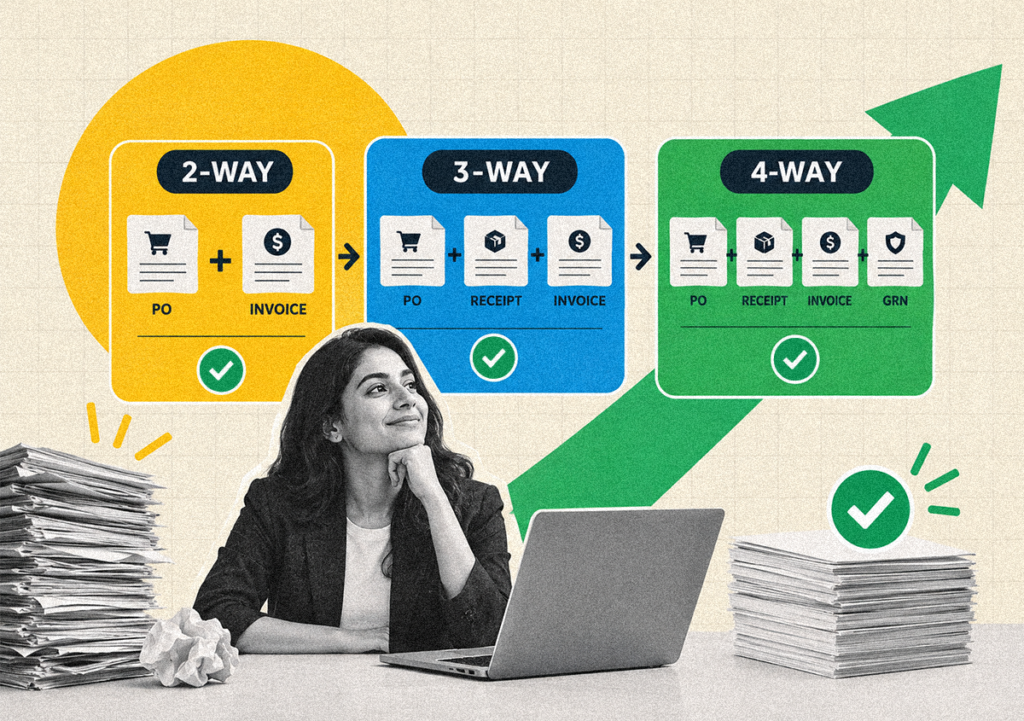
Anyone can demo a clean invoice gliding through. Ask about the ugly ones: no PO, price variance, partial receipt. Real automated invoice processing handles two-, three-, and four-way matching, treats non-PO invoices as first-class citizens, and tells your team why something fell out instead of dropping it into a mystery queue.
Automated Invoice Processing Software Also Needs Fraud Guardrails
Look for duplicate detection, controls on supplier bank-detail changes, and a complete audit trail. If your automated invoice processing software can’t show who approved what and when, your auditors will ask.
Procure-to-Pay Automation and Procurement Automation: Do You Need Both?
An invoice is the last chapter of a story that started with a requisition. When requisitions, Pos, and receipts live in other tools, matching turns into detective work. Procure-to-pay automation links the whole chain, so matches are built in, and procurement automation upstream hands AP cleaner data to begin with.
A rough rule: drowning in non-PO invoices or mismatches? Favor end-to-end procure-to-pay. If procurement already runs well elsewhere, an AP-focused tool with strong integrations may be enough.
The Best Accounts Payable Automation Solutions for Mid-Market and Enterprise Teams
Profiles draw on public vendor and review-site information as of November 2026. Packaging and pricing change often, so confirm specifics in a live demo.
Platform | Best for | Key strength | Watch for |
InvoiceAnywhere | One workflow from procurement to payment | PO and non-PO parity, 2/3/4-way matching, global vendor payments and discounts | Confirm connector depth for your ERP |
Tipalti | Global supplier payments | Payments and tax forms across many countries | Pricing isn’t public |
Medius | AP depth with light procurement | AI-assisted capture, fraud and duplicate alerts | Pricing isn’t public; few detailed reviews |
Basware | Multinationals and e-invoicing | E-invoicing network and purchase-to-pay breadth | Upfront cost and change management |
Coupa | One suite for all spend | Procurement, invoicing and expenses together | Long rollouts, high cost for smaller teams |
SAP Concur / S/4HANA | SAP-centric enterprises | Native fit with the SAP landscape | Heavier implementation, less flexibility |
HighRadius | Finance suites using AI agents | Email-driven capture and supplier statement reconciliation | AP is a newer line; vendor-reported metrics |
Stampli | Invoice-level collaboration | Approvals and conversations in one place | Some payment-export and edit limitations reported |
AvidXchange | Mid-market, real estate, construction | Payments network plus lien waivers | Support responsiveness and fee clarity |
Yooz | Mid-sized teams wanting fast setup | OCR plus requisitions and POs | Less value at low invoice volume |
InvoiceAnywhere: Best for Requisition-to-Payment in One Platform
(This one is ours.)
What it does: InvoiceAnywhere covers the full procure-to-pay loop: requisitions, PO creation, budget tracking, invoice processing, and global supplier payments, along with that ‘sweet’ early payment discount module built-in.
How it works: AI-powered capture reads invoices in any format. Each one is validated and matched two, three, or four ways against PO and goods-receipt data, and tax is reconciled between PO and invoice automatically. Exceptions are flagged with suggested fixes, approvals route through configurable workflows, and approved data syncs to your ERP. Payments go out in full, in part, or by milestone, in any currency, in any part of the world, at any time.
Key strengths: PO and non-PO invoices get the same rigor. Suppliers use a portal to submit invoices and track status. An early-payment discount module helps capture savings, duplicate detection catches repeat invoices before payment, and same-day invoice processing is supported. Fast implementations and after-sales service.
Best for: Manufacturers, distributors, multi-entity organizations, and federal and public sector agencies that want one workflow from request-to-payment or just the AP automation module.
Watch for: Connector depth may vary by ERP, though all global ERPs are supported. Run your ugliest invoices through a pilot before you commit.
Pros: End-to-end coverage cuts tool sprawl; near-touchless operation; full visibility from submission to payment; user-friendly dashboard; customizable workflow; high straight-through rates on exception invoices. Perfect for all sizes of enterprises anywhere in the world. The more invoices, the lower the cost of processing.
Cons: If you only need invoice capture, a full procure-to-pay platform may be more than you want to adopt. But good news – you can also get just the AP automation part without buying the full procure-to-pay suite.
Tipalti
What it does: A finance automation platform combining AP automation, procurement, and mass supplier payments.
How it works: Suppliers onboard through self-service portals, where tax forms such as W-9 and W-8 are collected. It captures, matches, and approves invoices, then pays them through multiple methods, with built-in VAT and 1099/1042-S reporting tools. By its own description, it reaches suppliers in 190+ countries and 120+ currencies.
Key strengths: Global payout reach, supplier onboarding, and tax compliance in one place.
Best for: Scaling companies paying many suppliers or contractors across borders.
Watch for: Pricing is quote-based. Its published integrations lean toward mid-market ERPs (NetSuite, Sage Intacct, QuickBooks, Xero), so check your ERP early.
Pros: Strong global payments and compliance tooling; dedicated support.
Cons: Opaque pricing; less obvious fit for large, SAP-heavy enterprises.
Medius
What it does: A dedicated AP automation platform that now positions itself around agentic AI.
How it works: It captures invoices from paper, PDFs, e-invoices, and XML, codes them to the ledger, routes approvals, and flags duplicate payments. A procurement module adds purchase requisitions and goods receipts for indirect spend.
Key strengths: Fraud and duplicate controls, AP benchmarking analytics, and integrations with Microsoft Dynamics, SAP, and Infor M3, among others.
Best for: Teams that want AP depth without buying a full source-to-pay suite.
Watch for: Pricing isn’t published, and public review volume is modest, so ask for references.
Pros: Reviewers praise ease of use and speed; solid controls.
Cons: Procurement is lighter than suite vendors; limited independent critique available.
Basware
What it does: A Finland-based source-to-pay vendor with a long record in AP automation and e-invoicing.
How it works: Machine-learning capture extracts invoice data and suggests coding, while its e-invoicing network and compliance tools handle multi-country requirements. Add-ons cover eProcurement, spend analytics, and early-payment programs.
Key strengths: E-invoicing reach and compliance, which matter as e-invoicing mandates spread.
Best for: Large multinationals and public-sector or regulated organizations.
Watch for: Reviewers cite significant upfront licensing and implementation costs, plus change-management effort.
Pros: Touchless processing potential; real-time spend visibility.
Cons: Reporting flexibility draws criticism; not as broad a procurement suite as the biggest ERP vendors.
Coupa
What it does: A business spend management suite covering procurement, invoicing, and expenses.
How it works: Requisitions and POs flow through approvals, invoices are matched electronically through a supplier portal, and expenses are captured on mobile. Everything feeds one view of spend.
Key strengths: One platform and one data model for all spend.
Best for: Companies standardizing procurement, AP, and expenses on a single vendor.
Watch for: Reviewers describe lengthy implementations, a supplier portal some vendors find clunky, and costs that sit high for smaller businesses.
Pros: Consolidation; useful reporting; intuitive interface.
Cons: Limited customization of views and workflows; slower support reported.
SAP Concur/SAP S/4HANA
What it does: Two routes for SAP-centric enterprises. Concur offers invoice management alongside its travel and expense products, while S/4HANA brings payables into the ERP core.
How it works: Invoices are processed within the SAP landscape, so ledger, PO, and vendor data sit in one system.
Key strengths: Native integration and a single system of record.
Best for: Enterprises already standardized on SAP.
Watch for: Implementation effort and flexibility. Adapting workflows can take formal change projects.
Pros: Tight ERP alignment; scale.
Cons: Heavier rollouts; less agile than specialist AP tools.
HighRadius
What it does: A finance-automation vendor best known for receivables, with an AP product built around AI agents.
How it works: An AI-managed AP inbox classifies supplier emails, captures header and line data, performs three-way matching, codes non-PO invoices to the GL, and supports approvals by email. A supplier portal handles onboarding with KYC/KYB checks, and statement reconciliation closes the loop. It states integrations with 50+ ERPs.
Key strengths: Email-centric workflows and supplier statement reconciliation.
Best for: Enterprises and mid-market teams already using HighRadius elsewhere in finance.
Watch for: Productivity and accuracy figures are the vendor’s own and unverified, and the AP line is newer than its receivables business, so ask for AP-specific references.
Pros: Broad ERP connectivity; modern AI approach.
Cons: Less AP track record than dedicated AP vendors.
Stampli
What it does: An invoice-centric AP platform that sits on top of your existing ERP.
How it works: Invoices are captured, coded, and approved with conversations and audit history attached to each one. It supports two- and three-way matching and multi-entity processing, and offers payments and cards as add-ons.
Key strengths: Collaboration inside the invoice, plus a user-friendly interface.
Best for: Mid-market teams with high payment volumes that want AP automation without replacing their ERP.
Watch for: Some reviewers report payment delays or export slowness, and limited ability to edit invoices after approval. Pricing isn’t published.
Pros: Smooth capture-to-approval flow; works alongside ERPs.
Cons: No built-in banking or treasury; mixed reports on reporting and support.
AvidXchange
What it does: A mid-market AP automation and payments provider.
How it works: Invoices are captured, coded, and routed for approval, then paid by virtual card, bank transfer, or check. A supplier portal shows payment status, and the platform connects to systems such as NetSuite, Sage, and Microsoft Dynamics.
Key strengths: A payments network plus industry features such as lien waiver management for construction.
Best for: Mid-market firms in real estate, construction, healthcare, and similar sectors.
Watch for: Reviewers mention slow support, confusing payment options and supplier fees, and occasional integration problems with some property-management systems.
Pros: Easy to learn; strong audit trail and workflow.
Cons: Bugs and payment delays reported by some users.
Yooz
What it does: A cloud AP and purchase-to-pay platform for mid-sized organizations.
How it works: It captures invoices by scan, email, mobile, or EDI, extracts data with AI-based OCR, codes and matches to POs, and routes approvals. Purchase requests can become POs automatically, with budget monitoring alongside.
Key strengths: OCR quality and breadth of ERP integrations.
Best for: Mid-sized businesses with meaningful invoice volume and a desire for fast rollout.
Watch for: Value drops at low volumes, and pricing has historically scaled with documents processed. Older reviews may not reflect today’s product.
Pros: Strong capture; reasonably priced for its scope.
Cons: Plain dashboard with limited customization.
How to Choose: Five Questions to Ask in Every AP Automation Demo
- Can you process my 100 ugliest invoices? Bring real ones: missing PO numbers, multiple currencies, partial shipments.
- What’s your straight-through rate on exception invoices? An overall touchless rate flatters everyone.
- How does the ERP integration work? Real-time and two-way, or nightly file drops?
- What happens when a supplier’s bank details change? You want a documented control, not a promise.
- Who owns implementation, and how long until the first live invoice?
Run the same five against every vendor, including us. Want to put InvoiceAnywhere through its paces? Book a demo at www.expenseanywhere.com.
FAQs
Accounts payable automation uses software to capture supplier invoices, code them, match them against POs and receipts, route them for approval, and trigger payment with little or no manual handling. AP automation typically plugs into your ERP so approved data flows straight into the ledger. The payoff is fewer keystrokes, faster cycle times, and a cleaner audit trail.
There's no single winner. The best AP automation software depends on your volume, your ERP, your share of non-PO invoices, and whether you need procurement covered too. Shortlist platforms with two-, three-, and four-way matching, strong exception handling, and global payments, then test each on your own invoices. InvoiceAnywhere, Tipalti, Medius, Basware, Coupa, SAP, HighRadius, Stampli, AvidXchange and Yooz are all common starting points.
OCR only reads text. Automated invoice processing goes further: it validates the data, codes it, matches it to POs and receipts, flags exceptions, routes approvals, and prepares payment. When you evaluate automated invoice processing software, ask how much of that chain runs without a person touching it.
If your pain starts at the invoice (keying, coding, approvals), invoice automation may be enough. If it starts earlier, with off-contract buying, missing Pos, or receiving mismatches, procure-to-pay automation and procurement automation fix the cause instead of the symptom.
Start with fully loaded cost per invoice (labor, systems, and overhead divided by invoices processed), plus cycle time, exception rate, and early-payment discounts captured. Multiply any per-invoice savings by annual volume. At 5,000 invoices a month, each $1 saved is worth $60,000 a year. Then compare that against the subscription and implementation costs of the accounts payable automation solutions on your shortlist.
Share:
Recent Post


Know about the latest happenings in the fintech automation.
Click below to subscribe to our newsletter!
-
Near-Touchless
Operation - One-Click Fully Audited Reports
-
Seamless ERP & TMC
Integrations
-
Automated 2/3/4-Way PO
Matching - Effortless Vendor Onboarding
-
Globally-Accepted Smart
Prepaid Cards