
PurchaseAnywhere® — The Smart Prepaid Card for Distributed Operations | Real Estate, Property Management & Healthcare
Merchant-Locked · FDIC Insured · Per-Facility Accounts

Every Facility Gets Its Own Smart Prepaid Card. You Stay In Control.

PurchaseAnywhere gives every property, clinic, and site its own FDIC-insured, merchant-locked reloadable prepaid debit card — so facility managers can handle emergency purchases instantly, while you see every transaction, control every balance, and reconcile everything automatically.

FDIC Insured
Merchant-Locked
Per-Facility Accounts
Auto Receipt Capture
Zero Fund Commingling
Merchant Locked
5281 •••• •••• 1104
Facility
Maple Tower — Lobby
Purchase
Anywhere
Merchant Locked
4409 •••• •••• 8823
Facility
North Clinic — Reception
Purchase
Anywhere
Merchant Locked
3714 •••• •••• 6601
Facility
Site B — Operations
Purchase
Anywhere
$340 loadedMaple Tower
Tap repair approvedAuto-reconciled
Blocked instantlyFrom dashboard
1
Dedicated card & account per facility — zero commingling
Zero
Cash floats, IOUs, or personal card reimbursements
Auto
Receipt capture, expense coding & card reconciliation
100%
Real-time spend visibility across every facility

Your Facilities Are Running on Petty Cash, Personal Cards & Promises.

When an AC breaks at a property at 2pm, when a clinic runs out of syringes mid-morning, when the coffee runs out five minutes before a client viewing — your facility manager needs to spend money right now. Here is what usually happens instead.

💸
The Petty Cash Box — Missing, Depleted, Unaccounted For
"The cash was there last week. Nobody knows who took $80 or what for. The box is empty. The manager paid out of pocket and needs a reimbursement — but doesn't have the receipt."
Each facility gets its own PA Card with a defined balance. No cash, no IOUs, no mystery spending. Ever.
🔊
Managers Paying on Their Personal Cards and Waiting to Be Reimbursed
"The plumber came, fixed the tap — $120. Manager paid on their Visa. Submitted a reimbursement. Finance approved it two weeks later. Nobody linked it back to the property."
PA Card is in the facility manager's hands — merchant-locked, pre-loaded, ready to go. No personal card. No reimbursement cycle. No delay.
🎪
No Visibility Into What Was Spent, Where, or Why
"Across 14 properties, we had 14 different ways of handling incidentals. Some used petty cash, some used personal cards, some called the office. We had no consolidated view of any of it."
Admin dashboard shows every facility's live balance and every transaction the moment it happens — by facility, by vendor, by category.
🏧
Shared Cards Mean Shared Risk and Zero Accountability
"We gave one corporate card to the area manager. It got used across three properties for things that should never have been on a corporate card. Untangling it at month-end took two days."
Each facility has its own dedicated card and its own dedicated FDIC-insured account. Funds never commingle. Every transaction belongs to one facility only.
🛍
Uncontrolled Spend — Wrong Vendors, Wrong Categories
"Someone used the facility card at a restaurant. Someone else bought personal items. Without merchant controls, a purchasing card is just a credit card with no guardrails and no accountability."
PA Card is merchant-locked to your approved vendor categories only. Transactions at unapproved merchants are declined at the terminal — automatically.
🧾
Month-End Reconciliation Is a Full-Day Nightmare
"Every month the accounts team chases 14 facility managers for receipts, reconciles petty cash boxes, and tries to match bank transactions to actual expenses. It takes two days and is never complete."
Every PA Card transaction triggers an automatic receipt capture prompt. Receipts are matched to transactions in real time. Month-end takes minutes — not days.

From Setup to First Purchase
in Under a Day

No IT project. No complex integration. No training programme. PurchaseAnywhere is live across all your facilities fast.

1
Admin Sets Up Facilities
Add each property, clinic, or site on the dashboard. Set merchant-lock categories, spend limits, and balance thresholds for each facility card.
2
Each Facility Gets Its Own Card & Account
A dedicated FDIC-insured account and merchant-locked prepaid card is provisioned per facility. Maple Tower's funds stay at Maple Tower — always.
3
Admin Loads Balances Remotely
Load each card from the admin dashboard — weekly, monthly, or on demand. Top up instantly. Unload or block any card in seconds if needed.
4
Manager Pays. App Captures. System Reconciles.
Manager taps the PA Card. App prompts for a receipt photo. Transaction is auto-coded, matched, and reconciled — automatically, before month-end.

Not a Corporate Card.
Not Petty Cash.
Something Smarter.

The PA Card is a reloadable prepaid debit card — FDIC insured, merchant-locked, and dedicated to a single facility on its own ring-fenced account. It is the only card built specifically for the way distributed operations actually work.

🔒
Merchant-Locked to Your Approved Vendors Only
You define the merchant category codes the card can transact at — HVAC vendors, plumbers, hardware stores, medical suppliers, cleaning supplies, café chains. Anything outside those categories is declined at the terminal, instantly.
🏮
FDIC-Insured, Per-Facility Dedicated Account
Every card is backed by its own FDIC-insured account. Maple Tower's balance is Maple Tower's balance — it never mixes with the North Clinic's or Site B's. Clean books, zero commingling, always.
🔄
Reloadable — Admin Controls Every Balance
Load each card with the right amount for the month or quarter. Top up remotely in one click. Set low-balance alerts so no facility is ever caught without funds mid-emergency.
Instant Block, Unload & Card Replacement
Block a card in seconds from the dashboard. Unload a balance and reissue to a new manager. Adjust merchant categories or spend limits instantly — from any device, anywhere.
📊
Real-Time Transaction Feed
Every swipe appears in the admin dashboard the moment it happens — vendor name, amount, merchant category, facility. No waiting for statements. No end-of-month surprises.
Merchant Locked
5281 •••• •••• 4407
Facility Account
Maple Tower — Property Mgmt
Purchase
Anywhere
Prepaid Debit · FDIC
FDIC
Insured
Per-Facility
Dedicated account
Real-Time
Transactions
Reloadable
Admin-controlled
Runs on the Visa / Mastercard network — accepted everywhere, but only completes at your pre-approved merchant categories.

Load. Unload. Block.
Complete Control Over Every Card, From One Screen.

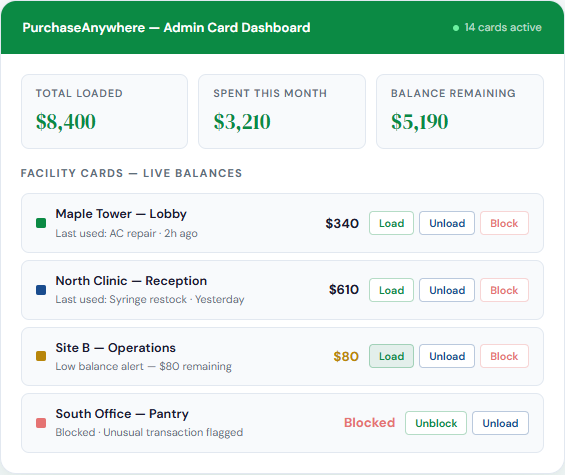
Every card, every facility, every balance — in one real-time dashboard. Control your entire card programme from any device, wherever you are.
💰
Load Funds to Any Card Instantly
Select a facility, enter an amount, confirm — funds arrive on the card within seconds. Bulk-load all facilities simultaneously at the start of each month with a single action.
↩️
Unload Unused Balances to Master Account
Sweep unused balances back to the central account at period end with one click. No funds sit idle at facilities that are not actively operating.
🚫
Block Any Card Immediately
Suspicious activity, a manager who has left, a facility temporarily closed — block the card in seconds and it stops working at the terminal immediately. No bank call required.
🔔
Low-Balance, High-Spend & Unusual Activity Alerts
Automatic alerts when a card balance drops below your threshold. Instant notification for out-of-pattern transactions. Never have a facility card fail mid-emergency because nobody noticed the balance was low.
PurchaseAnywhere Admin Card Dashboard

Every Purchase.
Captured, Coded & Reconciled
Automatically.

PurchaseAnywhere brings the same AI-powered receipt intelligence as ExpenseAnywhere — OCR that reads receipts, extracts data, and matches transactions automatically — applied to facility purchasing instead of employee expense reports.

📷
Receipt Capture on the PA Mobile App
The moment a PA Card transaction is approved, the facility manager's app prompts them to photograph the receipt. AI-powered OCR extracts vendor, amount, date, and line items automatically. Under 30 seconds, no typing.
🤖
Automatic Transaction Matching
The receipt data is automatically matched to the card transaction — same vendor, same amount, same timestamp. Mismatches are flagged for review. Matches are reconciled immediately and completely.
📂
Auto-Coded to Facility & Category
Every transaction is automatically tagged with the facility, cost centre, and expense category — AC maintenance, medical consumables, pantry supplies, cleaning. No manual coding by finance. Ever.
🔗
Direct Sync to Your Accounting Software
Reconciled transactions sync automatically to QuickBooks, Xero, Tally, SAP, Oracle, and more. Every facility's spend flows into the books with the correct account coding — without a single manual journal entry.
📷 Receipt Capture — North Clinic
🧾 Receipt photo captured OCR processing complete
VendorMedSupply Direct
Amount$47.80
ItemsSyringes x100, Cotton rolls x2
CategoryMedical Consumables
FacilityNorth Clinic — Reception
Card MatchMatched · PA Card 8823
Auto-reconciled · Synced to QuickBooks · No action needed

The Exact Moments
PurchaseAnywhere Was Built For

These are not hypothetical scenarios. These are the real, daily moments where your facility manager needs to spend money right now — and where the PA Card replaces chaos with a tap.

Property Management
🛀
Emergency Tap Repair
"A tenant calls — there's a tap leaking under the kitchen sink. The facility manager calls the plumber. He's there by noon. $140 for parts and labour. Who pays?"
PA Card, merchant-locked to plumbing and handyman services. Manager pays instantly. Receipt captured. Admin sees it in real time.
Property Management
❄️
AC Down in the Lobby
"It's 38 degrees. The AC in the commercial property lobby goes down. Tenants are calling. The HVAC contractor needs payment for parts on the spot — $280."
PA Card accepted at the HVAC vendor. No PO required, no personal card. Receipt captured on site, transaction reconciled before the contractor leaves.
Real Estate Development
🪟
Last-Minute Site Fix Before a Viewing
"Client viewing at 2pm. Site manager notices three light fittings are blown. Hardware store run — 20 minutes, $65 in bulbs and fittings. Viewing goes ahead."
PA Card locked to hardware and building supply merchants. Quick purchase, receipt photographed in the car, auto-coded to the project cost centre.
Serviced Apartments
Coffee Ran Out Before Investors Arrived
"Investors coming to view the development at 11am. Concierge realizes at 10:45am — no coffee. Three minutes to the nearest cafe. $34 for beans and milk."
PA Card locked to grocery and cafe categories. Purchase done before the investors arrive. Receipt auto-captured. Coded to hospitality.
Clinic
💉
Clinic Ran Out of Syringes
"Three back-to-back walk-ins. The clinic's syringe stock ran out mid-morning. Receptionist needs to get more from the medical supplier two blocks away — right now."
PA Card locked to medical supply merchants. Receptionist goes, pays, returns. Receipt photographed. Auto-coded to medical consumables.
Hospital / Clinic
🧻
Washroom Supplies Ran Out Mid-Day
"Patient washrooms at the clinic are out of tissues and paper towels mid-afternoon. It's a patient experience issue. Facility manager needs to run to the chemist — $28."
PA Card covers cleaning and consumable supply merchants. Purchase made. Receipt captured on the walk back. Zero admin overhead for the clinic head.

Configured for the Industries That
Operate Across Multiple Sites

PurchaseAnywhere is pre-configured with the right merchant-lock categories, balance structures, and account setups for each type of distributed operation — so you are live fast with controls that actually fit your business.

  • One PA Card per property or managed unit — each property has its own dedicated card and FDIC-insured account. Maple Tower's funds stay at Maple Tower, always. Zero commingling.
  • Pre-configured merchant categories for property maintenance — HVAC services, plumbing, electrical, locksmithing, hardware stores, cleaning supplies, and building materials — locked in by default
  • Emergency maintenance, no bottleneck — urgent repairs never wait for a purchase order or finance approval. The PA Card handles the emergency. Admin sees it the moment it happens.
  • Tenant-related incidentals handled instantly — welcome packs, move-in supplies, small replacements — all covered within the approved merchant categories, no reimbursement cycle
  • Property-level spend reporting — see exactly what each property spent, on what category, and with which vendor — by week or month — from one admin screen
  • Low-balance alerts prevent service failures — automated alerts when a property card drops below your defined threshold, so no facility is caught without funds mid-emergency
Property Management Snapshot
Zero
Petty cash boxes across the portfolio
Replaced with a dedicated PA Card per property
100%
Real-time spend visibility per property
Every transaction visible the moment it happens
Auto
Receipt capture and reconciliation
Month-end takes minutes — not days
  • One card per active development site — each site gets its own PA Card attached to a dedicated project-coded account, completely ring-fenced from other projects
  • Merchant-lock for site incidentals — hardware stores, trade suppliers, site safety, and small contractor payments locked in — nothing outside those categories can be charged
  • Show-home and client viewing support — hospitality, last-minute supplies, and presentation items purchased instantly without a formal purchase order cycle
  • Site manager autonomy within defined limits — managers act immediately within their card authority without calling the office for every small spend; admin sees everything in real time
  • Project-coded reconciliation — all PA Card transactions automatically allocated to the correct project cost centre in your accounting system, no manual journal entries
  • Multiple sites, one dashboard — all development sites across your portfolio visible, controllable, and reportable from a single admin screen
Real Estate Developer Snapshot
1
Card and account per active site
Project-coded, admin-controlled, FDIC-insured
Zero
Site manager reimbursement claims
PA Card replaces personal card use entirely
Auto
Project cost centre allocation
Every transaction coded to the right project
  • One card per clinic, ward, or facility — each unit in your network has its own PA Card with its own balance, separate from every other unit. No commingling between clinics or wards.
  • Merchant-lock for medical and facility supplies — locked to medical supply distributors, pharmacies, cleaning supply vendors, and hospitality merchants for patient-facing areas
  • Emergency consumable restocking, no purchase order needed — syringes, cotton rolls, gloves, dressings, tissues — purchased the moment stock runs low, without a procurement cycle
  • Patient experience incidentals handled gracefully — waiting area supplies, patient refreshments, comfort items — covered by the facility PA Card within approved merchant categories
  • Compliance-ready documentation on every purchase — every transaction has a receipt image and auto-captured category and vendor record, supporting clinical governance and accreditation audits
  • Network-level admin with clinic-level isolation — hospital group admin controls all clinics from one dashboard; each clinic account is fully ring-fenced from every other
Clinic & Hospital Network Snapshot
Zero
Fund commingling between clinics
Each facility account is fully ring-fenced
100%
Receipt documentation on every purchase
Auto-captured, audit-ready from day one
Auto
Consumable spend reconciliation
No manual matching — ever
  • One card per location, branch, or centre — every distributed facility gets its own PA Card and dedicated account, regardless of how many locations you operate
  • Custom merchant-lock by location type — configure approved merchant categories to fit each location's operations — hospitality, retail, office supplies, maintenance, or any combination
  • Central admin, distributed autonomy — head office controls every card's balance and limits; location managers operate independently within those limits — no calls to HQ for every small purchase
  • Bulk-load all facility cards at once — set a standard monthly allocation and load all cards simultaneously in one action at the start of each period
  • Cross-location spend benchmarking — compare incidental spend across comparable locations to identify outliers, unusual patterns, and opportunities to right-size card limits
  • New location onboarding in minutes — adding a new facility takes minutes: create the account, set merchant locks, define the limit, issue the card
Distributed Business Snapshot
Minutes
To onboard a new location
Create account, set locks, issue card — done
1-Click
Bulk-load all facility cards
Standard monthly allocation in one action
Full
Spend visibility at every location
Real-time, from one dashboard

Facility Purchasing: Then vs. Now

The difference between how distributed operations handle emergency and incidental purchasing today — and what PurchaseAnywhere makes possible from day one.

Today: Petty Cash & Personal Cards
  • Facility manager pays for the emergency repair on personal card, submits reimbursement
  • Petty cash box at each facility — regularly depleted, often unaccounted for
  • Finance chases receipts from every facility manager at month-end
  • No visibility into facility spend until invoices and reimbursements land on the desk
  • Shared corporate cards misused and impossible to allocate accurately by location
  • Two-week reimbursement cycle — facility managers frustrated and out of pocket
  • Month-end reconciliation takes days; completeness is always doubtful
  • Funds from different facilities commingled in the same account
With PurchaseAnywhere
  • Facility manager taps the PA Card — no personal money ever involved
  • Each facility has its own FDIC-insured account with a defined, admin-controlled balance
  • Every transaction triggers a receipt capture prompt — reconciled automatically
  • Admin sees every transaction across every facility the moment it happens
  • Each facility has its own merchant-locked card — misuse is declined at the terminal
  • No reimbursements. No waiting. No frustration. Ever.
  • Month-end reconciliation is automated — finance reviews exceptions, not raw data
  • Per-facility accounts — complete fund separation, always

Questions CFOs and Operations Directors
Ask Most Often

Straightforward answers about how PurchaseAnywhere works, how the card is controlled, and how it integrates with your existing processes.

When you set up a PurchaseAnywhere Card for a facility, you define which merchant category codes (MCCs) that card is permitted to transact at. MCCs are standardized codes the Visa/Mastercard network assigns to every merchant type — hardware stores have one MCC, restaurants another, medical suppliers another. For example, a property management card might be locked to hardware stores, plumbing and HVAC services, and cleaning supply vendors. When the facility manager attempts to use the card at a merchant whose MCC is not on the approved list — say, a restaurant, a clothing store, or a petrol station — the transaction is declined at the terminal in real time, before any charge is made. The card still works physically on the Visa/Mastercard network; it simply cannot complete outside your approved categories. You define the categories; the network enforces them.
FDIC insurance means the funds held in each facility's PurchaseAnywhere account are insured by the Federal Deposit Insurance Corporation up to applicable limits — the same protection you have on a standard bank account. If the card programme's banking partner were to fail, your deposits are protected. More importantly for day-to-day operations, each facility's account is completely separate from every other facility's account. If Maple Tower has $400 loaded and North Clinic has $600 loaded, those amounts are held in two distinct, isolated accounts. One facility's spending cannot affect another's balance. This also eliminates the accounting problem of commingled spend — each facility's transactions appear in their own account with no need to retrospectively separate charges that were all mixed in one place.
The moment a PA Card transaction is approved, the PurchaseAnywhere mobile app sends a push notification to the facility manager prompting them to photograph the receipt. They open the app, tap the notification, photograph the receipt, and the AI-powered OCR extracts all the data automatically — no typing needed. The whole process takes under 30 seconds. If a receipt is not submitted within a configurable time window (you set it — 24 hours, 48 hours, or 72 hours), the admin receives an alert and the transaction is flagged as pending receipt on the dashboard. You can also configure the card to restrict further purchases until outstanding receipts are cleared — giving you the leverage to ensure complete documentation without a single phone call to the facility manager.
Yes — every parameter is configurable per facility card. A large commercial property might have a higher monthly balance and access to HVAC, electrical, and plumbing merchant categories. A small residential property might have a lower balance restricted to hardware and cleaning supplies only. A clinic card can be locked exclusively to medical supply merchants and pharmacies. You can also set per-transaction limits — for example, no single purchase above $500 without a secondary admin approval, in addition to the overall balance limit. Changes take effect immediately. If you need to temporarily expand a card's merchant categories for a specific one-off purchase, you can do it from the dashboard in seconds and revert it equally quickly.
PurchaseAnywhere has native connectors to QuickBooks, Xero, Tally, Sage, SAP, Oracle, and Microsoft Dynamics. Once connected, every reconciled transaction — with its receipt image, vendor name, expense category, and facility code — is posted automatically to the correct account in your accounting software. The system applies the chart of accounts mapping you configure once at setup, so the right cost of maintenance, medical consumables, or pantry supplies lands in the right account for the right facility, automatically. Your finance team's role shifts from entering data to reviewing exceptions — which is where their time should be spent. For platforms not covered by native connectors, an open API is available.
Most organizations are fully live — all facilities configured, merchant locks set, accounting integration connected, and facility managers trained on the app — within 2 to 5 business days, regardless of the number of locations. Physical cards are issued and arrive within 5 to 7 business days. Virtual cards are available immediately upon account provisioning and work for any online or tap-to-pay transaction while physical cards are in transit. There is no IT project, no server installation, and no complex onboarding programme. Facility managers need only download the PA app, which takes 2 minutes. The admin setup — configuring facilities, setting merchant categories and limits, and connecting your accounting platform — is guided and typically takes one day for a portfolio of any size.

Give Every Facility Its Own Smart Card.
Keep Total Control.

Book a demo and see how PurchaseAnywhere eliminates petty cash boxes, personal card reimbursements, and month-end receipt chaos across your entire portfolio — from one real-time dashboard.

Real Estate · Property Management · Clinics & Hospitals · Distributed Businesses

Book a Demo →